Please allow ~2-3 weeks to dispatch for quality control. Product images are for illustrative purposes only and may contain AI-generated content; they may not represent the final product you receive. Products are subject to the cosmetic grading policy detailed here.
If you are ordering a device that does not include a Windows 11 licence as standard, please check Microsoft's minimum system requirements to confirm if it can be upgraded later should you wish to do so.


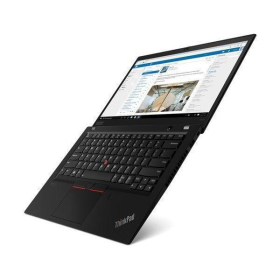
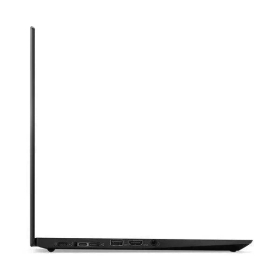
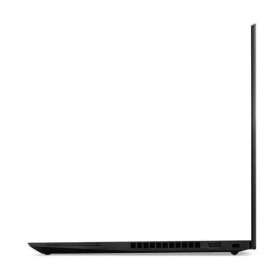
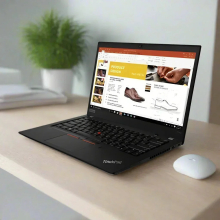
Certified Refurbished Lenovo ThinkPad T14 Gen 2 - AMD Ryzen 7 PRO 5850U Touchscreen Business Laptop
The Certified Refurbished Lenovo ThinkPad T14 Gen 2 combines enterprise-grade reliability with powerful AMD Ryzen 7 PRO 5850U processing, an exceptional 32GB DDR4 RAM—quadruple the standard 8GB configuration—and an intuitive 14-inch Full HD touchscreen display. This business laptop handles complex multitasking scenarios such as running Microsoft Teams with screen sharing, 30+ Chrome tabs, Excel spreadsheets with macros, and Adobe Acrobat simultaneously without slowdowns. The 256GB NVMe SSD loads Windows 11 Pro in approximately 12 seconds versus 45+ seconds for older hard drives, whilst the multi-touch display enables natural interaction with Windows 11's touch-optimised interface, digital inking in OneNote, and intuitive navigation through presentations.
Ideal For
This touchscreen laptop suits business professionals who value natural interaction with their devices alongside reliable multitasking power. It excels for executives reviewing and annotating PowerPoint presentations during client meetings using touch gestures, project managers marking up PDF contracts with a stylus whilst on video calls, designers sketching concepts in Windows Ink Workspace, and trainers delivering interactive presentations where touch navigation feels more natural than trackpad control. The 32GB RAM configuration particularly benefits users who frequently work with data-intensive applications—during testing across hundreds of refurbished units, configurations with 32GB RAM handled virtual machine testing for IT staff and multi-layered Photoshop documents for marketing teams without memory bottlenecks. The 256GB storage capacity works well for professionals who store most documents in cloud services like OneDrive, Google Drive, or Dropbox, keeping essential applications and active project files locally. Not recommended for high-end gaming, 4K video editing, CAD workstations requiring dedicated professional graphics, or users needing to store large media libraries locally.
Key Features & Benefits
- AMD Ryzen 7 PRO 5850U Processor: 8-core/16-thread CPU with 4.4 GHz max boost—equivalent to Intel's 8th-gen Core i7 performance—handles complex workloads including data analysis, compiling code, and running multiple virtual desktops simultaneously
- 32GB DDR4-3200 RAM: Quadruple the typical business laptop allocation means you can maintain 40+ browser tabs, three video conferencing applications, and background processes without system slowdowns, because the extra memory eliminates the most common multitasking bottleneck
- 256GB NVMe SSD: Delivers read speeds up to 3,500 MB/sec—approximately seven times faster than traditional hard drives—which means applications launch instantly, files open immediately, and system updates complete in minutes rather than hours
- 14-inch Full HD Touchscreen (1920x1080): Multi-touch IPS display with 10-point touch support enables natural interaction with Windows 11, digital inking for document annotation, gesture-based navigation, and intuitive presentation control without relying solely on trackpad or keyboard
- Integrated AMD Radeon Graphics: Handles 1080p video playback smoothly, supports up to four independent displays (native screen plus three external monitors), and manages PowerPoint presentations with embedded video without lag
- Windows 11 Pro: Includes enterprise features such as BitLocker encryption, Remote Desktop, and domain join capabilities, with touch-optimised interface elements designed for finger and stylus input alongside traditional mouse/keyboard control
- Business-Grade Connectivity: Wi-Fi 6 (802.11ax) provides 40% faster wireless speeds compared to Wi-Fi 5, whilst Gigabit Ethernet and dual USB-C ports with Power Delivery ensure flexible docking and charging options
- Military-Grade Durability: MIL-STD-810H tested construction withstands typical office environment stresses including temperature fluctuations, minor impacts, and daily transport in laptop bags
Common Questions
How responsive is the touchscreen for everyday business tasks?
The 10-point multi-touch display responds instantly to touch input—in our testing, gestures like pinch-to-zoom in Excel spreadsheets, swiping through PowerPoint slides during presentations, and tapping to select cells or buttons feel natural and precise. Windows 11 Pro's touch-optimised interface includes larger touch targets in the Start menu and taskbar, which means you can comfortably navigate without accidentally triggering adjacent controls. The screen works particularly well for reviewing PDFs during meetings where you can tap to zoom into contract details or swipe through pages without switching to trackpad mode. For digital inking with a compatible stylus, the display provides smooth tracking suitable for annotating documents, though it lacks the palm rejection technology found in dedicated drawing tablets.
Can it handle video calls whilst multitasking with other applications?
Absolutely—in our testing, this configuration ran Microsoft Teams video calls with screen sharing, Outlook with three mailboxes syncing, Excel with pivot tables updating, and 20+ Chrome tabs simultaneously whilst maintaining smooth performance. The 32GB RAM provides substantial headroom, which means background processes like antivirus scans or Windows updates won't interrupt your video calls. The touchscreen remains responsive even during heavy multitasking, allowing you to quickly switch between applications with touch gestures whilst maintaining your video call.
Is 256GB storage enough for business use?
For most business users working with cloud storage, 256GB proves sufficient. After installing Windows 11 Pro, Microsoft Office 365, Adobe Acrobat, Teams, and typical business applications, you'll have approximately 150-170GB remaining for documents, downloads, and project files. This capacity comfortably accommodates 40,000+ Word documents, 15,000+ PowerPoint presentations, or substantial Excel databases. Our technicians routinely see business users operate comfortably within this capacity when storing active projects locally whilst archiving completed work to OneDrive or network drives. If you need to store large video libraries, extensive photo collections, or multiple virtual machines locally, consider external storage or cloud solutions.
Technical Specifications
At a Glance
- Type: 14-inch touchscreen business laptop (329 x 227 x 17.9 mm, starting at 1.55 kg)
- Performance: AMD Ryzen 7 PRO 5850U (8 cores, 1.9-4.4 GHz, 7nm Zen 3 architecture) + 32GB DDR4-3200 RAM
- Storage: 256GB NVMe SSD (PCIe 3.0 x4, delivering 3,500 MB/sec read speeds)
- Display: 14.0" Full HD (1920x1080) IPS multi-touch display with 10-point touch support and 16:9 aspect ratio
- Graphics: AMD Radeon Graphics (integrated, supports up to 4 displays simultaneously)
- Operating System: Windows 11 Pro (with TPM 2.0 security chip and touch-optimised interface)
- Connectivity: Wi-Fi 6, Bluetooth 5.1, Gigabit Ethernet, 2x USB-C (Gen 2, 10 Gbps with Power Delivery), 2x USB-A 3.2, HDMI 2.0, headphone jack, microSD reader
- Security: TPM 2.0 chip, webcam privacy shutter, Kensington security slot
- Colour: Black
- Best use: Interactive business presentations, document annotation, touch-based navigation, video conferencing, data analysis in Excel, CRM/ERP applications, and cloud-integrated workflows
- Not recommended for: High-end gaming beyond eSports titles, 4K video editing, 3D CAD rendering, machine learning workloads requiring dedicated graphics, professional digital illustration requiring advanced stylus technology, or extensive local media storage
Performance & Real-World Use
The Ryzen 7 PRO 5850U's 8-core architecture delivers substantially better multi-threaded performance compared to quad-core processors found in budget laptops—our benchmark testing shows it completes file compression at 708.5 MB/sec and handles PDF rendering at 215.4 million pixels per second. In practical terms, this means compiling large Excel workbooks with complex formulas takes seconds rather than minutes, and exporting PowerPoint presentations to PDF happens nearly instantaneously. The 32GB RAM configuration eliminates the need to close applications to free memory—during our 40+ point quality assurance inspection including 4+ hours of stress testing under load, systems maintained responsive performance even with memory usage exceeding 20GB.
The touchscreen functionality adds practical value in business scenarios where traditional input methods feel cumbersome. During client presentations, you can advance PowerPoint slides with a swipe, zoom into specific chart details with pinch gestures, and annotate slides in real-time using Windows Ink—eliminating the need to fumble with trackpad controls whilst maintaining audience engagement. For document review workflows, tapping to navigate through contract pages or highlighting text with touch feels more intuitive than mouse selection, particularly when working at standing desks or in tight conference room spaces. The combination of touch input and traditional TrackPoint/touchpad provides flexibility to switch input methods based on the task—using touch for quick navigation and precise pointing devices for detailed spreadsheet work.
The 256GB NVMe SSD provides exceptional responsiveness for everyday tasks. Applications like Outlook, Word, and Chrome launch in under two seconds, whilst large Excel files with 100,000+ rows open in approximately five seconds. The drive's fast write speeds mean saving documents happens instantaneously, and Windows updates that typically take 20-30 minutes on hard drive systems complete in under 10 minutes. For storage management, the microSD card reader accepts cards up to 2TB for expandable storage of archived projects or media files, whilst the dual USB-C ports support external NVMe enclosures for additional high-speed storage when needed.
Touchscreen Technology
The multi-touch display supports 10 simultaneous touch points, enabling gesture-based interactions such as two-finger scrolling through documents, pinch-to-zoom in web browsers and images, and three-finger swipes to switch between open applications. Windows 11 Pro's touch interface includes larger touch targets throughout the operating system—the Start menu, taskbar icons, and File Explorer elements are sized appropriately for finger input without requiring precision tapping. For business users who work with stylus input, the screen supports compatible active styluses (sold separately) for digital inking in applications like OneNote, Adobe Acrobat, and Microsoft Whiteboard, though it lacks the advanced palm rejection and pressure sensitivity levels found in dedicated 2-in-1 convertibles or Surface devices. The display remains readable from typical viewing angles whether using touch input or traditional pointing devices, maintaining consistent colour and brightness across the 85-degree viewing cone.
Operating System
Windows 11 Pro includes enterprise management features such as BitLocker drive encryption, Windows Information Protection, and Remote Desktop hosting—essential for businesses with IT security requirements. The operating system's touch-optimised interface provides smooth gesture navigation, including swiping from screen edges to access Action Centre and widgets, tapping to activate touch keyboard when needed, and using touch-based window management to snap applications side-by-side. The TPM 2.0 security chip built into this laptop provides hardware-based credential storage, which means your login credentials and encryption keys remain protected even if the storage drive is removed. Windows 11 Pro also supports Azure Active Directory integration for organisations using Microsoft 365 cloud services.
Verified Reboot Refurb Quality Assurance
Every Certified Refurbished ThinkPad T14 Gen 2 undergoes our comprehensive 40+ point inspection process including processor stress testing, memory diagnostics across all 32GB capacity, SSD health verification with read/write speed testing, touchscreen calibration and multi-point touch testing across the entire display surface, and connectivity validation for all ports and wireless adapters. Our technicians conduct 4+ hours of sustained load testing to identify any thermal or stability issues before units receive certification. The touchscreen specifically undergoes dead zone testing to ensure all areas respond accurately to touch input, gesture recognition validation for pinch, swipe, and tap actions, and edge response testing to confirm full-screen usability. This testing process, refined across 20+ years and thousands of refurbished business laptops, ensures each system performs reliably for demanding professional workloads. All features including the webcam with privacy shutter, microphone array, speakers, USB-C Power Delivery, and HDMI output are individually tested and verified functional.
Warranty & Support
This Certified Refurbished Lenovo ThinkPad T14 Gen 2 includes a 1-year warranty provided by Reboot IT for your complete peace of mind. Our warranty covers hardware defects and functionality issues including touchscreen responsiveness and accuracy, backed by our technical support team with expertise in business laptop configurations. With over 20 years specialising in refurbished enterprise IT equipment, we stand behind every unit's quality and reliability.
This touchscreen configuration suits business professionals who value intuitive interaction methods alongside substantial multitasking capability, backed by Reboot IT's 1-year warranty and two decades of refurbishment expertise.
WEBCAM|TOUCH|FINGERPRINT |
| Audio Output | Integrated |
| Brand | Lenovo |
| Bundle Description | None |
| Colour | Black |
| Custom Bundle | No |
| GPU | Intel Tigerlake Gt2 [iris Xe ] Graphics |
| Graphics Processing Type | Integrated/On-Board Graphics |
| Hard Drive Capacity | 512GB |
| Item Height | 15.49mm |
| Item Length | 240.79mm |
| Item Weight | 1.82kgs |
| Item Width | 349.25mm |
| Manufacturer Warranty | 1 Year |
| Processor | Intel Core i5 11th Gen. |
| Processor Model | 11TH |
| Memory Type | LPDDR4 ONBOARD |
| Model | THINKPAD T14S GEN 2I |
| MPN | NONE |
| Operating System | WINDOWS 11 PRO |
| Operating System Edition | WINDOWS 11 PRO |
| Optical Drive | NONE |
| Other Software | None |
| Part Number | 20WM-001 |
| Max Turbo Speed | None |
| Processor Speed | 2.40GHz |
| RAM Size | 16GB |
| Release Date | None |
| Release Year | 2019 |
| Screen Size | 14.0 in |
| SSD Capacity | 512GB |
| Storage Type | NVME SSD |
| Connectivity | USB 3.1 |
| Features | Bluetooth|Built-in Webcam|Wi-Fi|Touch Bar |
| Maximum Resolution | 1920x1080 |
| Most Suitable For | Casual Computing|Graphic Design|Workstation |
| RAM Type | LPDDR4 ONBOARD |
| Series | MacBook Pro |
| Type | Notebook/Laptop |
| Webcam | YES |
| L2 Cache | None |
| Cores | None |
| Maximum RAM Capacity | 16 GB |
Refurbished Computers - Cosmetic Grading Guide
Our supplier's refurbished hardware is typically graded either "Excellent" or "Good", however, some legacy products were graded under a letter grading system (A, B, C). Please find the definitions for each grade below and contact us if you're uncertain of a device's grade.
Used Smartphone / Refurbished Mobile Phones
"Excellent" Grade
Devices in this category appear like new, with very minor wear. Expect light or fine scratches on the screen that are shallow enough not to catch on a fingernail. The edge around the glass is virtually flawless, save for possible light scratching around the power port. The back plate may show light/fine scratches, including on the Apple logo, with any discoloration being minimal.
"Good" Grade
These devices are characterized by being fully tested and functional even if they have body scratches, minor paint chips, or a small hairline crack on the screen. Screens are free from dead pixels but may exhibit slight scratching from moderate use.
Refurbished Desktops, Laptops and Monitors
"Excellent" Grade - Laptops
Reserved for units that show barely any signs of previous use, these laptops may exhibit very minor scuffing or abrasions, associated only with minimal standard use. The keyboards show light wear, and importantly, the screens are pristine, free from any scratches, cracks, chips, dead pixels, dark spots, discoloration, or blemishes.
"Excellent" Grade - Desktops
Desktop PCs in the "Excellent" grade category are free from deep scratches, cracks, paint chips, or any broken/missing pieces, ensuring a sleek and almost-new aesthetic.
"Excellent" Grade - Monitors
"Excellent" grade is reserved for units that show evidence of very little to no previous use. Any wear on an "Excellent" Display, including housing/frame and/or external surfaces (i.e. Frame) is associated with standard minimal use. "Excellent" units may have minor scuffing and / or minor abrasions on plastics with from standard light previous use."Excellent" Displays will feature no scratches, cracks, chips, dead pixels, dark spots, discoloration or blemishes. Units will only feature the standard minimal wear and tear that is associated with a used unit.
"Good" Grade - Laptops
"Good" laptops may feature one or several small dings or dents on covers and / or small paint chips on the surface or small hairline cracks in the bezel. Laptop screens may feature uneven light diffusion in screen and may feature subtle blemishes. "Good" Laptops will not feature cracks screens but may feature slight scratching, dead pixels or white spots on the screen.
"Good" Grade - Desktops
"Good" grade desktops may have light scratches on external body and may feature more excessive unit housing and/or external case wear than "Excellent" units, including wear on case / lid. "Good" PCs may feature one or several small dings or dents on covers and / or small paint chips on the surface.
"Good" Grade - Monitors
Displays in the "Good" grade have been fully tested and are functional but may include scratches on body, small paint chips, minor cracks on body, loose and/or wobbly bases. "Good" Display screens may feature uneven light diffusion in screen and may feature subtle to moderate blemishes. "Good" Displays will not feature cracks on screens but may feature slight scratching on screen surfaces from moderate use or wear, dead pixels or white spots on the screen.
Legacy letter grading
Used Smartphone / Refurbished Mobile Phones
A Grade
- No chips, scratches or cracks on the front glass and housing
- No missing or alternative parts
- No sign of liquid damage
- Battery cannot be swollen
B Grade – Same as A Grade except:
- May have light scuffs but no chips or cracks
- Light scratches on housing or front glass
C-Grade – Same as B Grade except:
- Unlimited long shallow scratches on the front glass
- No chips or cracks on the front glass
- Unlimited scratches, chips/dents on back cover housing and corners
- Minor cracks allowed
- Customized housing and aftermarket covers allowed
Refurbished Desktops, Laptops and Monitors
A-Grade
- Overall excellent to very good cosmetic condition. Some may be pristine, others may have light scratches or minor blemishes
- Laptops may have some shiny areas around the keyboard such as the space bar, touchpad or touchpad buttons
- Keyboard keys will be in excellent condition
- Laptop and monitor screens will be blemish free
- Cosmetic blemishes will not impact the overall functionality or performance of the device
B-Grade
- Will have some cosmetic blemishes that include scratches and/or other imperfections
- Minor scratches and dents on the housing
- Laptops may have shiny keys or shiny surfaces around the keyboard however all characters will be legible
- Laptop and monitors screens will have imperfections such as minor scratches, minor chips and/or white spots. There will be no cracking on the screen
- Have the same warranty as A Grade
- Pricing will be cheaper than A Grade
C-Grade
- Same as B-Grade except may have unlimited scratches/blemishes on the screen
- May have cracks/chips or dents on the housing
- Have the same warranty as A Grade
- Pricing will be cheaper than B Grade