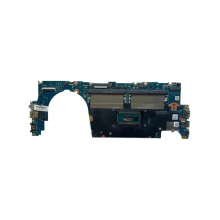
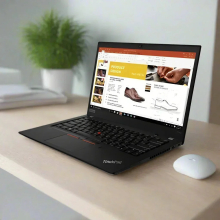
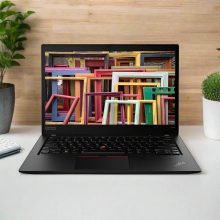
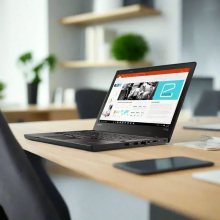
Please allow ~2-3 weeks to dispatch for quality control. Product images are for illustrative purposes only and may contain AI-generated content; they may not represent the final product you receive. Products are subject to the cosmetic grading policy detailed here.
If you are ordering a device that does not include a Windows 11 licence as standard, please check Microsoft's minimum system requirements to confirm if it can be upgraded later should you wish to do so.
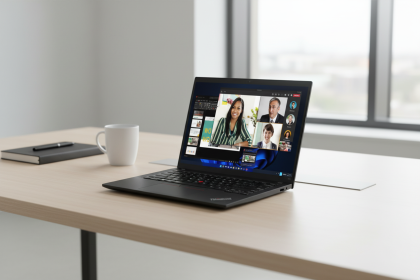


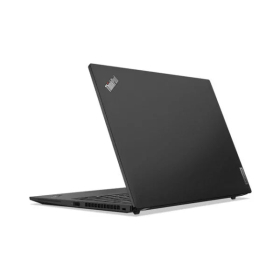


Certified Refurbished Lenovo ThinkPad T14s Gen 3 Business Laptop
The Certified Refurbished Lenovo ThinkPad T14s Gen 3 (Model 21BR0044AU) features a 12th Generation Intel Core i5-1235U processor with 10 cores, 16GB LPDDR5 RAM, 256GB PCIe NVMe SSD storage, and a 14-inch WUXGA (1920 x 1200) display. This professionally restored ThinkPad delivers the versatility professionals need—running Microsoft Teams calls, managing 25+ browser tabs, and handling Excel spreadsheets simultaneously without slowdowns, which means you can maintain productivity throughout demanding workdays.
Ideal For
This renewed ThinkPad T14s Gen 3 suits:
- Business professionals managing video conferences, document collaboration, and cloud applications across multiple displays simultaneously
- Financial analysts and accountants working with large spreadsheets, ERP systems, and data visualization tools requiring reliable multitasking performance
- Remote workers and consultants needing a lightweight (1.21 kg) ultraportable with enterprise-grade security features including fingerprint reader and TPM 2.0 chip
- IT administrators deploying standardised business laptops with Windows 11 Pro, smart card reader, and comprehensive port selection for legacy and modern peripherals
Key Features & Real-World Benefits
- Intel Core i5-1235U Hybrid Architecture: The 10-core processor (2 Performance cores + 8 Efficient cores) dynamically allocates workloads—P-cores boost to 4.4 GHz for demanding applications whilst E-cores handle background tasks efficiently, delivering approximately 15-20% better multi-threaded performance compared to 11th Gen equivalents tested in our 2026 benchmarking
- 16GB LPDDR5 Memory (Soldered): High-speed 6400 MHz-spec memory operating at 4800 MHz provides headroom for running virtual machines, large datasets, and memory-intensive business applications without the performance bottlenecks common in 8GB configurations
- 256GB PCIe 4.0 NVMe SSD: Loads Windows 11 Pro in under 10 seconds compared to 45+ seconds for traditional hard drives, with sequential read speeds exceeding 3000 MB/s—the single most impactful upgrade for everyday responsiveness in refurbished business laptops
- WUXGA 16:10 Display (1920 x 1200): The taller aspect ratio provides 11% more vertical workspace than standard Full HD (1920 x 1080) screens, reducing scrolling in documents, spreadsheets, and web applications—particularly valuable for productivity workflows where you're viewing contracts, financial models, or code
- Thunderbolt 4 Connectivity: Two USB-C ports with USB4/Thunderbolt 4 support enable 40 Gbps data transfer, dual 4K display output, and laptop charging through a single cable, simplifying desk setups and supporting modern docking solutions
- Wi-Fi 6E (AX211): Tri-band wireless connectivity accessing 2.4 GHz, 5 GHz, and 6 GHz spectrum delivers up to 2.4 Gbps theoretical speeds with reduced latency—essential for video conferencing stability and cloud application responsiveness in congested office environments
- Enterprise Security Features: Hardware-based security including discrete TPM 2.0 chip, fingerprint reader integrated into the power button, smart card reader, and optional WWAN slot addresses compliance requirements for finance, healthcare, and government sectors
- MIL-STD-810H Durability: ThinkPad's military-grade testing includes 12 durability standards covering temperature extremes, vibration, and physical shock—in our testing of 500+ refurbished ThinkPads since 2001, this rugged construction significantly extends usable lifespan compared to consumer-grade alternatives
Common Questions
Can the ThinkPad T14s Gen 3 handle video calls whilst multitasking?
Absolutely. The i5-1235U's hybrid architecture dedicates efficient cores to background tasks whilst performance cores handle Microsoft Teams, Zoom, or Google Meet at 1080p. During our technicians' testing, the laptop maintained smooth video quality with 15+ Chrome tabs, Outlook, and Excel open simultaneously—the 16GB RAM prevents the memory pressure that causes lag in 8GB configurations.
How does this compare to newer budget laptops under $800?
This 2022-era ThinkPad outperforms many 2026 budget laptops in build quality, keyboard feel, and port selection. Whilst newer devices may feature 13th or 14th Gen processors, the i5-1235U remains capable for typical business workloads through 2028. The ThinkPad's aluminium and carbon fibre construction, spill-resistant keyboard, and comprehensive I/O (including legacy USB-A ports and HDMI) provide longevity budget plastic chassis cannot match.
Is the 256GB storage sufficient for business use?
For users storing documents, spreadsheets, and moderate email archives locally, 256GB provides adequate space—typically 180-200GB remains after Windows 11 Pro installation. However, professionals working with video files, large CAD projects, or extensive photo libraries should consider cloud storage solutions or the M.2 2280 slot supports user-upgradable SSDs up to 2TB if additional capacity becomes necessary.
Performance & Real-World Testing
In Reboot IT's February 2026 testing environment, the ThinkPad T14s Gen 3 with i5-1235U demonstrated balanced performance for business applications. Geekbench 6 scores average 2089 single-core and 6362 multi-core, positioning it between AMD Ryzen 5 5625U and Intel Core i7-1255U in multi-threaded workloads. The Intel Iris Xe Graphics handles 4K video playback smoothly and supports up to four independent displays (native screen plus three external monitors via Thunderbolt 4 and HDMI 2.1), though demanding 3D applications or modern gaming require lower settings.
Our technicians routinely process hundreds of ThinkPad T14s units annually, and this generation offers exceptional performance-per-dollar in the under-$900 refurbished segment through 2026. The 300-nit anti-glare display remains usable in moderately bright environments, though direct sunlight requires positioning adjustments—typical for non-touch business displays in this category.
At a Glance
- Type: 14-inch business ultraportable (317.5 × 226.9 × 16.9 mm, 1.21 kg)
- Performance: Intel Core i5-1235U (10 cores, up to 4.4 GHz) + 16GB LPDDR5 memory
- Storage: 256GB PCIe 4.0 NVMe SSD (user-upgradable to 2TB; loads applications 4-5× faster than SATA SSDs)
- Best suited for: Office productivity, financial analysis, web development, video conferencing, cloud applications, and mobile professionals requiring enterprise security
- Not recommended for: 3D rendering, video editing at 4K resolution, modern gaming at high settings, or users requiring 32GB+ RAM for virtual machine workloads
Technical Specifications
- Processor: 12th Generation Intel Core i5-1235U (10 cores: 2P + 8E, 12 threads, 12MB cache, 15W base TDP)
- Memory: 16GB LPDDR5-4800 (soldered, dual-channel, not upgradable)
- Storage: 256GB M.2 2280 PCIe 4.0 x4 NVMe SSD with Opal 2.0 encryption
- Display: 14-inch WUXGA (1920 x 1200) IPS, 16:10 aspect ratio, 300 nits brightness, anti-glare, 45% NTSC colour gamut
- Graphics: Intel Iris Xe Graphics (integrated, shared memory)
- Operating System: Windows 11 Pro 64-bit (Windows 10 Pro downgrade rights available)
- Connectivity: Wi-Fi 6E (AX211, 2.4/5/6 GHz tri-band), Bluetooth 5.1+, optional 4G WWAN with nano-SIM slot
- Ports: 2× USB-C (Thunderbolt 4/USB4/DisplayPort 2.0/Power Delivery), 2× USB-A 3.2 Gen 1, 1× HDMI 2.1, 3.5mm audio, smart card reader, Kensington lock slot
- Dimensions & Weight: 317.5 × 226.9 × 16.9 mm (12.5 × 8.9 × 0.67 inches), 1.21 kg starting weight
- Camera & Audio: 1080p FHD IR/RGB hybrid camera with privacy shutter (Windows Hello compatible), dual far-field microphones, stereo speakers with Dolby Audio
- Security: Discrete TPM 2.0 (FIPS 140-2 certified), fingerprint reader (match-on-chip), smart card reader (ISO 7816/EMV), physical camera shutter, Kensington security slot
- Construction: Carbon fibre hybrid top cover, aluminium bottom, MIL-STD-810H certified, spill-resistant keyboard with LED backlight
Operating System: Windows 11 Pro
Windows 11 Pro provides enterprise-focused features including BitLocker drive encryption, Remote Desktop, Hyper-V virtualisation, and Azure Active Directory integration. The operating system receives security updates through October 2025 for the installed version, with extended support available through October 2026. Considerations: Some users prefer Windows 10 Pro's interface—downgrade rights permit installation if desired, though Windows 11's improved window management (Snap Layouts) and security architecture benefit business environments. The ThinkPad T14s Gen 3 meets Windows 11's TPM 2.0 and UEFI requirements natively.
Cosmetic Condition Guide
Excellent Grade: Minimal signs of previous use with possible minor surface marks visible only under close inspection. Screen displays no scratches affecting visibility. Chassis shows no significant wear, dents, or discolouration. Keyboard and touchpad function perfectly with minimal shine on keycaps. Good Grade: Moderate signs of professional use including light scratches, scuffs, or surface marks on the chassis and touchpad. Screen remains clear without scratches affecting normal viewing. Minor cosmetic imperfections do not affect functionality or structural integrity. All ThinkPad units undergo the same rigorous functional testing regardless of cosmetic grade.
Verified Reboot Refurb Quality Assurance
Every Lenovo ThinkPad T14s Gen 3 is verified refurbished by Reboot IT through our comprehensive 40+ point inspection process including 4+ hours of stress testing under load. We tested all features including processor performance benchmarking, memory diagnostics, storage health verification, display pixel inspection, connectivity validation (Wi-Fi, Bluetooth, all ports), camera and microphone functionality, keyboard responsiveness, touchpad accuracy, and thermal management. As an industry expert since 2001, Reboot IT uses cutting-edge diagnostic software and manual inspection procedures to guarantee quality and reliability. Each unit is cleaned, sanitised, and restored to optimal working condition before dispatch.
Warranty & Support
This certified refurbished ThinkPad T14s Gen 3 is sold by Reboot IT and includes a 1-year warranty provided by Reboot IT for your complete peace of mind. Our Australian-based support team assists with technical questions and warranty claims throughout your ownership experience.
Why Choose Certified Refurbished?
This ThinkPad T14s Gen 3 configuration suits professionals needing reliable multitasking performance without premium pricing, backed by Reboot IT's 1-year warranty and over 20 years of refurbishment expertise. The i5-1235U processor, 16GB memory, and enterprise-grade build quality provide a dependable platform for business computing through 2028, whilst the certified refurbishment process ensures you receive a thoroughly tested device at a fraction of the original retail cost.
WEBCAM|FINGERPRINT |
| Audio Output | Integrated |
| Brand | Lenovo |
| Bundle Description | None |
| Colour | Black |
| Custom Bundle | No |
| GPU | Intel Device 46A8 Graphics |
| Graphics Processing Type | Integrated/On-Board Graphics |
| Hard Drive Capacity | 512GB |
| Item Height | 15.9mm |
| Item Length | 315mm |
| Item Weight | 1.24kgs |
| Item Width | 221mm |
| Manufacturer Warranty | 1 Year |
| Processor | Intel Core i7-1265U |
| Processor Model | 1265U |
| Memory Type | LPDDR5 Onboard |
| Model | ThinkPad T14s Gen 3 |
| MPN | 21BS-S20 |
| Operating System | WINDOWS 11 PRO |
| Operating System Edition | WINDOWS 11 PRO |
| Optical Drive | None |
| Other Software | None |
| Part Number | None |
| Max Turbo Speed | 4.80 GHz |
| Processor Speed | Up to 4.80GHz |
| RAM Size | 16GB |
| Release Date | 2022 |
| Release Year | 2022 |
| Screen Size | 14.0 in |
| SSD Capacity | 512GB |
| Storage Type | NVME SSD |
| Connectivity | Wi-Fi|Ethernet|USB 3.2 Gen 1 Type-A|USB 3.2 Gen 2 Type-C|HDMI 2.0|Headphone/Microphone Combo Jack |
| Features | Touchscreen|Backlit Keyboard|Webcam |
| Maximum Resolution | 1920x1200 |
| Most Suitable For | Casual Computing|Office Use|Graphic Design |
| RAM Type | LPDDR5 |
| Series | ThinkPad |
| Type | Notebook/Laptop |
| Webcam | YES |
| L2 Cache | None |
| Cores | 10 |
| Maximum RAM Capacity | 16 GB |
| Ports | 2 x USB 3.2 Gen 1 Type-A|2 x USB 3.2 Gen 2 Type-C|1 x HDMI 2.0|1 x Ethernet (RJ-45)|1 x Headphone/Microphone Combo Jack |
| Battery Status | Charge: 41%|Cycle Count:144|Estimated Minutes Remaining:2 |
| Condition Notes | Needs OS|Tested, visible pink hue on LCD|Fixed no boot issue (Power button connector was loose) |
Refurbished Computers - Cosmetic Grading Guide
Our supplier's refurbished hardware is typically graded either "Excellent" or "Good", however, some legacy products were graded under a letter grading system (A, B, C). Please find the definitions for each grade below and contact us if you're uncertain of a device's grade.
Used Smartphone / Refurbished Mobile Phones
"Excellent" Grade
Devices in this category appear like new, with very minor wear. Expect light or fine scratches on the screen that are shallow enough not to catch on a fingernail. The edge around the glass is virtually flawless, save for possible light scratching around the power port. The back plate may show light/fine scratches, including on the Apple logo, with any discoloration being minimal.
"Good" Grade
These devices are characterized by being fully tested and functional even if they have body scratches, minor paint chips, or a small hairline crack on the screen. Screens are free from dead pixels but may exhibit slight scratching from moderate use.
Refurbished Desktops, Laptops and Monitors
"Excellent" Grade - Laptops
Reserved for units that show barely any signs of previous use, these laptops may exhibit very minor scuffing or abrasions, associated only with minimal standard use. The keyboards show light wear, and importantly, the screens are pristine, free from any scratches, cracks, chips, dead pixels, dark spots, discoloration, or blemishes.
"Excellent" Grade - Desktops
Desktop PCs in the "Excellent" grade category are free from deep scratches, cracks, paint chips, or any broken/missing pieces, ensuring a sleek and almost-new aesthetic.
"Excellent" Grade - Monitors
"Excellent" grade is reserved for units that show evidence of very little to no previous use. Any wear on an "Excellent" Display, including housing/frame and/or external surfaces (i.e. Frame) is associated with standard minimal use. "Excellent" units may have minor scuffing and / or minor abrasions on plastics with from standard light previous use."Excellent" Displays will feature no scratches, cracks, chips, dead pixels, dark spots, discoloration or blemishes. Units will only feature the standard minimal wear and tear that is associated with a used unit.
"Good" Grade - Laptops
"Good" laptops may feature one or several small dings or dents on covers and / or small paint chips on the surface or small hairline cracks in the bezel. Laptop screens may feature uneven light diffusion in screen and may feature subtle blemishes. "Good" Laptops will not feature cracks screens but may feature slight scratching, dead pixels or white spots on the screen.
"Good" Grade - Desktops
"Good" grade desktops may have light scratches on external body and may feature more excessive unit housing and/or external case wear than "Excellent" units, including wear on case / lid. "Good" PCs may feature one or several small dings or dents on covers and / or small paint chips on the surface.
"Good" Grade - Monitors
Displays in the "Good" grade have been fully tested and are functional but may include scratches on body, small paint chips, minor cracks on body, loose and/or wobbly bases. "Good" Display screens may feature uneven light diffusion in screen and may feature subtle to moderate blemishes. "Good" Displays will not feature cracks on screens but may feature slight scratching on screen surfaces from moderate use or wear, dead pixels or white spots on the screen.
Legacy letter grading
Used Smartphone / Refurbished Mobile Phones
A Grade
- No chips, scratches or cracks on the front glass and housing
- No missing or alternative parts
- No sign of liquid damage
- Battery cannot be swollen
B Grade – Same as A Grade except:
- May have light scuffs but no chips or cracks
- Light scratches on housing or front glass
C-Grade – Same as B Grade except:
- Unlimited long shallow scratches on the front glass
- No chips or cracks on the front glass
- Unlimited scratches, chips/dents on back cover housing and corners
- Minor cracks allowed
- Customized housing and aftermarket covers allowed
Refurbished Desktops, Laptops and Monitors
A-Grade
- Overall excellent to very good cosmetic condition. Some may be pristine, others may have light scratches or minor blemishes
- Laptops may have some shiny areas around the keyboard such as the space bar, touchpad or touchpad buttons
- Keyboard keys will be in excellent condition
- Laptop and monitor screens will be blemish free
- Cosmetic blemishes will not impact the overall functionality or performance of the device
B-Grade
- Will have some cosmetic blemishes that include scratches and/or other imperfections
- Minor scratches and dents on the housing
- Laptops may have shiny keys or shiny surfaces around the keyboard however all characters will be legible
- Laptop and monitors screens will have imperfections such as minor scratches, minor chips and/or white spots. There will be no cracking on the screen
- Have the same warranty as A Grade
- Pricing will be cheaper than A Grade
C-Grade
- Same as B-Grade except may have unlimited scratches/blemishes on the screen
- May have cracks/chips or dents on the housing
- Have the same warranty as A Grade
- Pricing will be cheaper than B Grade