


-
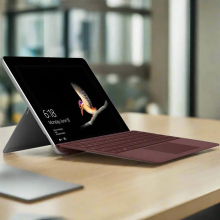 Microsoft Surface Go (2018) Refurbished – 1 Year Warranty by Reboot IT The Microsoft Surface Go (2018) refurbished model features an Intel Pentium Gold 4415Y dual-core processor at 1.6 GHz, paired with 8 GB of LPDDR3 RAM and a speedy 128 GB NVMe SSD, all showcased on a vibrant 10-inch PixelSense touchscreen with 1800 x 1200 resolution. This compact device is perfect for users seeking a lightweight yet capable tablet with solid performance for everyday tasks. Sold by Reboot IT with a 1-year warranty, this certified refurbished unit undergoes thorough testing to ensure reliability and quality.$121.73 ex GST1 in stock
 -
 Microsoft Teams is a tool within Office 365 that enables collaboration in your organisation. Recent research by Forrester found that the successful implementation of Microsoft Teams delivers 3.2 hours per user per week in time saved through improved collaboration, information sharing and more efficient meetings. This webinar, by the I.T. Team Limited will introduce you to Microsoft’s Teams, its core functions and benefits. Course Outcomes: By the end of this webinar your organisation will have: A better understanding of what Microsoft Teams is. An understanding of how Microsoft Teams can be used to empower your workforce. See Microsoft Teams functions in action including Video Calling, Chat, Group Conversations, Document Collaboration, Mobile access and more. Audience - This webinar is suitable for: Business and NFP founders / managers IT Managers Anyone wanting to improve collaboration across their organisation. What is not included in the program? The technical implementation of Microsoft Teams Advanced Microsoft Teams functionalityRecorded some time ago.Watch now
 -
By the end of this webinar your organisation will have: A better understanding of what Microsoft Teams is. An understanding of how Microsoft Teams can be used to empower your workforce. See Microsoft Teams functions in action including Video Calling, Chat, Group Conversations, Document Collaboration, Mobile access and more. Audience - This webinar is suitable for: Business and NFP founders / managers IT Managers Anyone wanting to improve collaboration across their organisation.Recorded some time ago.Watch now
-
 MICROSOFT SURFACE BOOK 2 13.5" CERTIFIED REFURBISHED TABLET PC Introducing the Microsoft Surface Book 2 13.5-inch certified refurbished tablet PC, featuring an Intel Core i5-7300U 2.6 GHz 7th-generation processor, 8 GB LPDDR3 RAM, 256 GB NVMe SSD storage, stunning 13.5" PixelSense touchscreen with 3000 x 2000 resolution, Intel HD Graphics 620, and Windows 10 Pro operating system—a premium hybrid device that seamlessly transitions between laptop and tablet modes for work and creativity. Overview$252.64 ex GST5 in stock
 -
This Webinar is a handy "Emergency Kit" for everyone in the meetings and events industry who deals with budgets and bottom lines and having to prove the value of their events. Whether you're pretty savvy already, or are just beginning to build out a strategy, this webinar will give you key takeaways you can use immediately. At the very least, it can serve to not only clear up the confusion surrounding how to prove the implicit value of your events, but also to provide a reference tool that the most effective of meeting and event professionals can turn to in times of need. Or emergenc Optional Read before the webinar: https://www.cvent.com/au/resources/essential-guide-to-event-roi Course Outcomes: During the webinar we’ll cover: How focusing on your brand and using the right data can prove event value. How attendee experience impacts ROI. How to tell your event retention story. How to tie your events to pipeline and demonstrate ROI. Audience This webinar is suitable for: Anyone involved with Events/Marketing Tal Meretz – Event Technology Strategist After finishing his Masters at Monash, Tal joined Cvent as a Strategic Meetings Management Specialist. Working with NFP and Universities, he works with organisations looking to improve the automation, quality and data collection across entire event lifecycles.Recorded some time ago.Watch now
-
 Email remains a primary driver of communications at most organisations, but the way we work has changed dramatically. We read and send emails from home, the grocery store, and the cafe using whatever device is most convenient in the moment: phone, laptop, tablet. Sometimes we don't have a dedicated office, or dedicated IT teams. Working from multiple locations using multiple devices means that security on those devices and their doorways into your systems needs to be super locked down and manageable centrally. Remember that time your staff member lost their laptop and you had to suddenly figure out if it was going to create a major security risk for your organisation? That is exactly why Connecting Up strongly recommends not-for-profits move their email and other critical systems to the cloud, and Office 365 is the most popular cloud software available through Connecting Up.Posted on 06/10/2021 by
-
Microsoft Office 365 in the Cloud offers many not-for-profits significant benefits. This presentation gives an overview of the features of Office 365, explores the benefits other organisations have gained from making the move to the Cloud and identify factors that organisations should consider when planning the move to Office 365.Recorded some time ago.Watch now
-
Microsoft Surface Book 2 i5 8350U 1.7GHz 8GB 256GB 13.5" Touch W11P | 3mth Wty | Excellent conditionMICROSOFT SURFACE BOOK 2 13.5" CERTIFIED REFURBISHED TABLET PC Experience premium hybrid computing with the Microsoft Surface Book 2 13.5-inch certified refurbished tablet PC, featuring an Intel Core i5-8350U 1.7 GHz 8th-generation quad-core processor, 8 GB LPDDR3 RAM, 256 GB NVMe SSD storage, stunning 13.5" PixelSense touchscreen with 3000 x 2000 resolution, Intel UHD Graphics 620, and Windows 11 Pro operating system—a powerful 2-in-1 device that seamlessly transitions between laptop and tablet modes for professionals and creatives. Overview$343.55 ex GST2 in stock
-
 Microsoft 365 is a powerful suite of productivity tools that includes familiar Office apps like Word, Excel, and PowerPoint, as well as cloud-based services like Exchange, OneDrive, Teams, and SharePoint. In this webinar, we will introduce you to the key features and benefits of Microsoft 365 and show you how to get the most out of them. Whether you haven’t touched 365 yet, are only using 365 for Office, or are already dabbling with several of the services, this webinar will have something for you. We'll start by exploring the different apps and services included in Microsoft 365, how they work together and what existing functions 365 will take on and improve.Past webinar.Recorded on 7 Mar, 2023 11:00am - 12:00pm.Watch now