


-
 Transitioning to remote work is new to many organisations and can present many unique challenges. Leaders and managers are learning to adapt to flex schedules and appreciate different boundaries. IT teams are learning how to triage employee requests while ensuring company and employee data is secure. Teams are learning how to collaborate and brainstorm without physical post-its and whiteboards. We know the full shift to remote work isn’t always easy - there are, however, various technologies that organisations like yours are using to help manage and support a remote workforce. Additionally, organisational leaders and managers can leverage soft skills to ensure your employees can adapt to this new way of working. Join this session to learn: The various challenges when transitioning to remote work How to keep employees engaged and productive How technology can support your employees and your organisation Not available on this date and time? Register anyway! All webinar registrants will receive a full recording and the slides after the webinar has been presented. IMPORTANT: If you do not receive the link to join the webinar 24 hours before the commencement date/time, please contact events@connectingup.org to request this information.Recorded some time ago.Watch now
 -
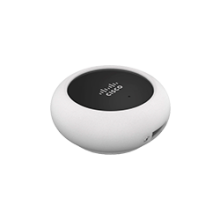 The MA-PWR-MV-LV is a 12/24V power adapter that converts low-voltage power into Power over Ethernet (PoE) for Cisco Meraki MV series indoor and outdoor security cameras. See the official product specifications for the MA-PWR-MV-LV at the Meraki website.$74.00 ex GSTIn stock
 -
 The MA-PWR-50WAC is a 50-watt, 12-volt power supply that can provide local power to a Cisco Meraki indoor wireless access point. This donation includes Meraki MA-PWR-50WAC power adapter Meraki MA-PWR-CORD-XX AC power cord Obtaining Your Product Connecting Up might request additional information to verify that your organization matches the Cisco philanthropy guidelines. You will receive a confirmation email from Connecting Up when your request is approved, followed by additional messages with shipping and delivery information. You should receive your product within three weeks of the approval date. This product cannot be shipped to a PO Box. If your organization’s shipping address is a PO Box or is different from its physical location, we will ship your request to your organization’ s physical address.$44.00 ex GSTIn stock
-
B2C Technologies is a social enterprise, determined to address the growing divide between various socio-economic groups so that everyone can access technology and learn digitally-necessary life-skills. To bridge the divide, B2C Technologies works with the government and corporate enterprise to refurbish their donated computers and laptops. As a Microsoft Registered Refurbisher all computers are fully decommissioned, cleaned, tested and comes with approved Microsoft software installed.
-
 Customize an altogether better solution with the HP PC Mounting Bracket for Monitors, which lets you attach your HP Desktop Mini, HP Chromebox, or select HP Thin Client directly behind select HP Z Displays and EliteDisplays. Maximize your available work area with a single-footprint solution. Simply attach the bracket to the back of your display, and your PC platform to the bracket. It’s that easy! Retain the comfort features of your HP Elite Display or HP Z Display. The bracket doesn’t interfere with the monitor’s height adjustment, tilt, swivel or pivot settings Compatible with: E202, E222, E232, E230t, E240, E240c, E240q, E242, E272q Z22n, Z23n, Z24nf, Z24nq, Z24n, Z24s, Z25n, Z27n, Z27q, Z32x HC240, HC270$21.73 ex GST59 in stock
 -
 This is a guest case study from our partner Bonjoro. It first appeared on the Bonjoro website. We live in a world of information overload, where our attention is constantly being seized by promotions, sales pitches, and newsletters. Inboxes have been embedded with smart technology, filtering mass emails into folders called "promotions", and telephone recognition software is making it harder for conventional fundraising phone banks to get through.Posted on 25/08/2021 by
-
Providing IT Solutions for small to medium businesses in Perth since 1998 specialising in Microsoft Small Business Networks
-
 Employers delivering “child-related work” are required by law to check that the members of their workforce hold a valid Working With Children Check – and they are required to maintain those checks on an ongoing basis.Posted on 25/03/2022 by
 -
 Moving to the Cloud is a big step for most organisations, especially if you are a small not-for-profit with limited budget, resource and time. How can you be sure that you are moving in the right direction, using the right solutions and taking all the necessary steps to ensure a smooth transition? This webinar will give you a 10-step checklist of things to consider and evaluate before moving to a Public Cloud solution to avoid undesirable situations and issues that can be quite costly. In addition to that, you will also learn about: The advantages and disadvantages of Public Cloud solutions The differences between Google Apps and Office 365 About the presenter - Tony NissenWatch now