


-
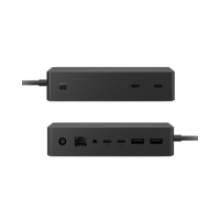 Certified Refurbished Microsoft Surface Dock 2 The Microsoft Surface Dock 2 (Model 1917) transforms your Surface device into a complete desktop workstation with four USB-C ports (10 Gbps), two USB-A ports, Gigabit Ethernet, and dual 4K display support at 60Hz. Released in 2020 as Microsoft's premium docking solution, this professionally restored unit delivers 199W total power—including 120W to your Surface device—which means you can charge even power-hungry Surface Laptop Studio models whilst running multiple peripherals simultaneously. During our testing with Surface Pro and Laptop devices, this dock handles demanding setups with external monitors, USB drives, wired networking, and audio devices without the cable clutter of individual adapters.$79.91 ex GST56 in stock
 -
 Microsoft Surface Book 2 13.5" - FOR PARTS ONLY - AS IS SOLD FOR PARTS ONLY - NO WARRANTY - NO RETURNS - AS IS CONDITION This Microsoft Surface Book 2 features an Intel Core i5-8350U 8th Generation processor (1.70 GHz, turbo boost up to 3.60 GHz), 8GB LPDDR3 RAM, 256GB PCIe NVMe SSD, 13.5-inch display with 3000 x 2000 resolution, Intel UHD Graphics 620, and Windows 11 Pro. This unit is being sold strictly for parts or repair purposes only. Known Issues - Read Carefully This device has the following defects:$179.91 ex GST1 in stock
 -
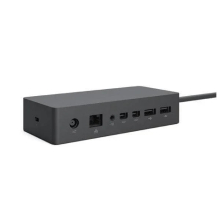 Microsoft Surface Dock 1661 – Certified Refurbished Desktop Docking Station Streamline your productivity with effortless connectivity—the Microsoft Surface Dock 1661 is the ultimate solution for transforming your Surface device into a fully-equipped desktop workstation. Featuring a quad-core CPU compatibility, 4 USB 3.0 ports, dual Mini DisplayPorts, Gigabit Ethernet, and dedicated audio output, this refurbished dock delivers premium functionality at an affordable price. Compact and durable with a professional matte black finish, it’s designed to simplify multitasking and keep your workspace clean, organised, and future-ready.$29.29 ex GST183 in stock
-
 Your volunteers are important. And in most cases, most of your work would be impossible without them. That’s why it’s important to recruit the best volunteers – and once you have them, it’s important to retain them. Recruiting and retaining volunteers can be a difficult task, but nonprofit technology makes it easier. Phil from Keela will talk about a few use cases that will illustrate how a CRM can be used to get the best volunteers, and keep them engaged for years to come. Course Outcomes: Best practices in recruiting the best volunteers How to keep a donor base/volunteer base engaged How to use your CRM to keep track of projects DOs and DON’Ts for recruiting and retaining volunteers from real-world, CRM-based examples About the Presenter - Phil Manzano Phil is the Head of Marketing and Communications at Keela. He has worked as a communications professional within the sector at many levels: grassroots, local, regional and national. He has spent time working with United Way, Plan International and with Microsoft’s Philanthropy teams. Now, he spends his time telling powerful stories of impact and is devoted to helping nonprofits do good, better.Recorded some time ago.Watch now
 -
Microsoft Teams is a tool within Office 365 that enables collaboration in your organisation. Recent research by Forrester found that the successful implementation of Microsoft Teams delivers 3.2 hours per user per week in time saved through improved collaboration, information sharing and more efficient meetings. This webinar, by the I.T. Team Limited will introduce you to Microsoft’s Teams, its core functions and benefits. Course Outcomes: By the end of this webinar your organisation will have: A better understanding of what Microsoft Teams is. An understanding of how Microsoft Teams can be used to empower your workforce. See Microsoft Teams functions in action including Video Calling, Chat, Group Conversations, Document Collaboration, Mobile access and more. Audience - This webinar is suitable for: Business and NFP founders / managers IT Managers Anyone wanting to improve collaboration across their organisation. What is not included in the program? The technical implementation of Microsoft Teams Advanced Microsoft Teams functionalityRecorded some time ago.Watch now
-
By the end of this webinar your organisation will have: A better understanding of what Microsoft Teams is. An understanding of how Microsoft Teams can be used to empower your workforce. See Microsoft Teams functions in action including Video Calling, Chat, Group Conversations, Document Collaboration, Mobile access and more. Audience - This webinar is suitable for: Business and NFP founders / managers IT Managers Anyone wanting to improve collaboration across their organisation.Recorded some time ago.Watch now
-
 Every charity/not-for-profit procures goods and services, from the smallest new charity to those with multi-million dollar turnovers. No matter how large or small a charity is, the basic procurement processes are the same. The process entails identifying the requirements and suppliers, negotiating and awarding contracts, managing contracts and suppliers and monitoring the savings produced and benefits delivered. Compared to a small start-up charity, larger charities understandably have more complex procurement processes, which will take longer to complete. When sourcing, for example, there will be a larger budget, more stakeholders and decision-makers involved. In order to ensure consistency, transparency, and control over the whole procurement process, most charities will have their own procurement processes with guidelines for employees to follow to ensure they get the best value from their suppliers.Posted on 13/01/2022 by
 -
 Microsoft 365 is a powerful suite of productivity tools that includes familiar Office apps like Word, Excel, and PowerPoint, as well as cloud-based services like Exchange, OneDrive, Teams, and SharePoint. In this webinar, we will introduce you to the key features and benefits of Microsoft 365 and show you how to get the most out of them. Whether you haven’t touched 365 yet, are only using 365 for Office, or are already dabbling with several of the services, this webinar will have something for you. We'll start by exploring the different apps and services included in Microsoft 365, how they work together and what existing functions 365 will take on and improve.Past webinar.Recorded on 7 Mar, 2023 11:00am - 12:00pm.Watch now
 -
and Outcomes: This webinar we will cover; What is SharePoint? Key functions inside SharePoint. How SharePoint interacts with other key Microsoft services like Teams and OneDrive Best practice tips, tricks and “watch out’s” for implementation. This webinar is suitable for: Business and NFP founders / managers IT Managers Anyone wanting to improve the security of their organisations information/data. Includes: Live access to webinar, participation in live Q&A session at the end of the webinar, access to post webinar recording and slides as well as any additional templates provided by the speakerRecorded some time ago.Watch now