Please allow ~2-3 weeks to dispatch for quality control. Product images are for illustrative purposes only and may contain AI-generated content; they may not represent the final product you receive. Products are subject to the cosmetic grading policy detailed here.
If you are ordering a device that does not include a Windows 11 licence as standard, please check Microsoft's minimum system requirements to confirm if it can be upgraded later should you wish to do so.
.rbt-desc { font-family: -apple-system, BlinkMacSystemFont, 'Segoe UI', Arial, sans-serif; font-size: 14px; line-height: 1.7; color: #222; }
.rbt-desc .header-block { border-bottom: 3px solid #0060a9; margin-bottom: 28px; padding-bottom: 16px; }
.rbt-desc h1 { color: #0060a9; font-size: 22px; margin: 0 0 8px 0; font-weight: bold; overflow-wrap: break-word; text-wrap: balance; }
.rbt-desc .summary { margin: 0; font-size: 14px; color: #555; }
.rbt-desc h2 { color: #0060a9; font-size: 17px; margin: 30px 0 12px 0; font-weight: bold; padding-bottom: 7px; border-bottom: 1px solid #e0e0e0; overflow-wrap: break-word; text-wrap: balance; }
.rbt-desc p { margin: 0 0 13px 0; }
.rbt-desc ul { margin: 0 0 13px 0; padding-left: 22px; }
.rbt-desc li { margin-bottom: 10px; line-height: 1.65; }
.rbt-desc table { width: 100%; border-collapse: collapse; margin: 14px 0 22px 0; }
.rbt-desc .specs-table th { background-color: #0060a9; color: #fff; padding: 10px 12px; text-align: left; font-weight: bold; font-size: 13px; letter-spacing: 0.3px; }
.rbt-desc .specs-table td { padding: 9px 12px; border: 1px solid #e0e0e0; vertical-align: top; }
.rbt-desc .specs-table tr:nth-child(even) { background-color: #f5f8fb; }
.rbt-desc .specs-table td:first-child { font-weight: bold; width: 32%; background-color: #eef2f7; color: #2c3e60; }
.rbt-desc .comparison-table td { width: 50%; padding: 16px 18px; vertical-align: top; border: 1px solid #e0e0e0; line-height: 1.8; }
.rbt-desc .best-for { background-color: #edf7ee; }
.rbt-desc .not-for { background-color: #fdf0ee; }
.rbt-desc .condition-table th { background-color: #0060a9; color: #fff; padding: 10px 12px; text-align: left; font-size: 13px; letter-spacing: 0.3px; }
.rbt-desc .condition-table td { padding: 9px 12px; border: 1px solid #e0e0e0; vertical-align: middle; }
.rbt-desc .condition-table tr:nth-child(even) { background-color: #f5f8fb; }
.rbt-desc .grade-badge { display: inline-block; padding: 3px 10px; border-radius: 12px; font-weight: bold; font-size: 12px; letter-spacing: 0.3px; white-space: nowrap; }
.rbt-desc .grade-a { background-color: #d4edda; color: #1a5c2e; }
.rbt-desc .grade-b { background-color: #fff3cd; color: #7a5000; }
.rbt-desc .grade-c { background-color: #e9ecef; color: #4a4a4a; }
.rbt-desc .warranty-block { background-color: #f5f8fb; padding: 16px 18px; border-left: 4px solid #0060a9; margin: 16px 0 22px 0; }
.rbt-desc .warranty-block p { margin: 0 0 10px 0; }
.rbt-desc .warranty-block p:last-child { margin: 0; }
.rbt-desc .faq-q { font-weight: bold; color: #0060a9; margin: 22px 0 5px 0; font-size: 14px; }
.rbt-desc .faq-a { margin: 0 0 4px 0; }
Intel Core i5-7500T 2.7GHz Quad-Core • 8GB DDR4 RAM • 500GB SATA HDD • Windows 10 Pro • Ultra-Compact USDT Form Factor • Multiple Display Support • TPM 2.0 Security • 12-Month Warranty
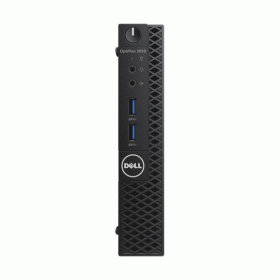
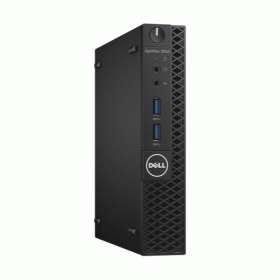
The Dell OptiPlex 3050 represents exceptional business-grade computing power in an ultra-compact package designed for professional environments. This certified refurbished desktop features a powerful 7th generation Intel Core i5-7500T processor with four cores running at 2.7GHz (boosting to 3.3GHz), paired with 8GB of high-speed DDR4 memory and a reliable 500GB SATA hard drive. Pre-installed with Windows 10 Pro and backed by a comprehensive 12-month warranty from Reboot IT, this space-saving desktop delivers enterprise reliability for modern workplace demands.
What Makes the Dell OptiPlex 3050 a Strong Desktop Choice?
- 7th Generation Intel Performance: The i5-7500T Kaby Lake processor delivers 14nm efficiency with Intel Turbo Boost 2.0 technology, providing responsive multitasking for demanding business applications while maintaining energy-efficient 35W TDP operation.
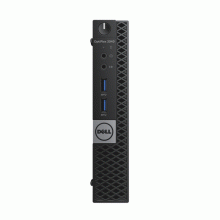
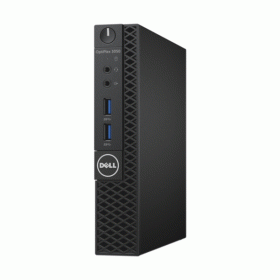
- Ultra-Compact Professional Design: At just 182mm x 178mm x 36mm, the USDT form factor occupies minimal desk space while delivering full desktop capabilities, making it ideal for space-constrained offices, reception desks, and modern workspaces.
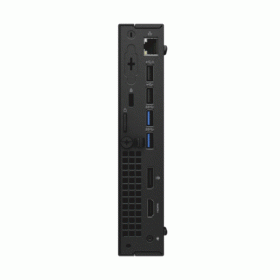
- Multi-Display Business Productivity: Supports up to three simultaneous displays via HDMI 1.4, DisplayPort 1.2, and VGA outputs, enabling comprehensive workstation setups for financial analysis, design work, and multi-application workflows.
- Enterprise Security Standards: Built-in TPM 2.0 security chip provides hardware-based encryption, secure boot capabilities, and credential protection, meeting modern business compliance requirements for data security and privacy.
- Verified Refurbishment Quality: Each OptiPlex 3050 undergoes Reboot IT's rigorous testing protocol including component validation, performance benchmarking, and quality assurance to ensure reliable operation equivalent to new equipment.
- Windows 11 Upgrade Ready: Full compatibility with Windows 11 Pro through TPM 2.0, UEFI firmware, and Secure Boot support, providing future OS upgrade flexibility for long-term business planning.
How Does the Dell OptiPlex 3050 Perform in Daily Business Use?
In real-world business environments, the OptiPlex 3050 excels at multitasking scenarios common to modern professional workflows. The quad-core i5-7500T processor handles simultaneous operation of Microsoft Office applications, email clients, web browsers with multiple tabs, and video conferencing software without performance degradation. Users typically experience smooth operation when running Excel spreadsheets with complex formulas, PowerPoint presentations, Outlook with large mailboxes, and Chrome or Edge browsers with 15+ active tabs concurrently.
The 8GB DDR4-2400 memory configuration provides adequate headroom for typical business computing loads, supporting seamless switching between applications and maintaining responsive system performance during peak usage periods. The integrated Intel HD Graphics 630 delivers crisp display output for business graphics, presentations, and video content, while efficiently driving multiple monitors for enhanced productivity workflows.
For storage-intensive tasks, the 500GB SATA hard drive provides substantial capacity for document storage, email archives, and application installations. While not as fast as SSD storage, the mechanical drive offers reliable performance for typical business file operations, with boot times averaging 45-60 seconds and application launches completing within acceptable timeframes for professional use.
Complete Technical Specifications
| Processor | Intel Core i5-7500T (7th Gen Kaby Lake) 4 Cores, 4 Threads 2.7GHz Base, 3.3GHz Turbo 6MB Smart Cache, 35W TDP |
| Memory | 8GB DDR4-2400 SODIMM 2 Memory Slots (32GB Maximum) Non-ECC, Dual Channel Support |
| Storage | 500GB SATA III Hard Drive (7200 RPM) M.2 2280 SSD Slot Available 2.5" SATA Bay for Additional Storage |
| Graphics | Intel HD Graphics 630 (Integrated) DirectX 12, OpenGL 4.4 Hardware Video Decode (H.264, H.265) |
| Display Outputs | 1x HDMI 1.4 (4K@30Hz) 1x DisplayPort 1.2 (4K@60Hz) 1x VGA (1920x1200@60Hz) Triple Display Support |
| USB Ports | 4x USB 3.1 Gen1 (5Gbps) 2x USB 2.0 Front: 2x USB 3.1 Gen1, Audio Jack Rear: 2x USB 3.1 Gen1, 2x USB 2.0 |
| Network | Gigabit Ethernet (Intel I219-LM) RJ-45 Port Optional WiFi Card Slot Available |
| Audio | Realtek ALC3234 HD Audio Line Out, Microphone/Line In Front Panel Audio Jack |
| Security | TPM 2.0 Security Chip Chassis Intrusion Switch Kensington Lock Slot UEFI Secure Boot |
| Operating System | Windows 10 Pro 64-bit Windows 11 Pro Compatible Genuine Microsoft License |
| Form Factor | Ultra Small Desktop (USDT) 182mm x 178mm x 36mm Space-Saving Vertical/Horizontal |
| Power | External 65W AC Adapter Energy Star Certified Low Power Consumption Design |
| Weight | Approximately 1.2kg Lightweight Desktop Solution |
| Expansion | M.2 2280 PCIe/SATA SSD Slot 2.5" SATA Drive Bay Mini PCIe WiFi Card Slot |
Is the Dell OptiPlex 3050 Right for Your Needs?
|
✓ Best For: • Small office and home office setups • Reception desk and customer service stations • Educational computer labs and classrooms • Multi-monitor business productivity workflows • Space-constrained professional environments • Digital signage and kiosk applications |
✗ Not Recommended For: • 3D rendering and CAD workstations • Gaming beyond casual browser games • Video editing and media production • High-performance computing tasks • Applications requiring dedicated graphics cards • Users needing SSD speed for boot performance |
Understanding Condition Grades and Battery Health
While desktop computers don't have internal batteries, our comprehensive grading system ensures you understand exactly what cosmetic condition to expect with your Dell OptiPlex 3050. Each grade represents different levels of previous use and cosmetic wear, though all grades deliver identical performance and reliability.
| A — Excellent | Minimal wear, like-new appearance | Not Applicable (Desktop) |
| B — Good | Light usage marks, fully functional | Not Applicable (Desktop) |
| C — Fair | Visible wear, excellent functionality | Not Applicable (Desktop) |
Every OptiPlex 3050 receives our Verified Refurb certification, including comprehensive testing of all ports, display outputs, internal components, and system stability regardless of cosmetic grade. Desktop systems include all necessary power cables and are ready for immediate deployment.
Frequently Asked Questions About the Dell OptiPlex 3050
What warranty coverage is included with this desktop?
Your OptiPlex 3050 includes a comprehensive 12-month warranty from Reboot IT covering all hardware components, software functionality, and technical support. This provides the same protection as new equipment purchases.
Can this desktop run multiple monitors for productivity work?
Yes, the OptiPlex 3050 supports up to three simultaneous displays using the HDMI, DisplayPort, and VGA outputs. This configuration is excellent for financial analysis, design work, and multi-application business workflows.
Is this computer compatible with Windows 11 for future upgrades?
Absolutely. The OptiPlex 3050 meets all Windows 11 requirements including TPM 2.0 security chip, UEFI firmware, and Secure Boot capability, ensuring seamless OS upgrade options when needed.
How much desk space does the USDT form factor require?
The ultra-compact design measures just 182mm x 178mm x 36mm (roughly 7" x 7" x 1.4"), taking minimal desk space. It can be positioned vertically or horizontally and weighs only 1.2kg for easy placement.
What refurbishment testing does Reboot IT perform on each desktop?
Every OptiPlex 3050 undergoes comprehensive component testing, performance benchmarking, port functionality verification, display output testing, and complete system stability validation through our Verified Refurb certification process.
Does this model include WiFi connectivity for wireless networking?
This configuration includes Gigabit Ethernet for wired network connections. The system has an available mini PCIe slot for adding a WiFi card if wireless connectivity is required for your setup.
How does the i5-7500T processor perform for typical business applications?
The quad-core i5-7500T delivers excellent performance for Office applications, web browsing, email, video conferencing, and multitasking scenarios. The 35W TDP ensures energy-efficient operation while maintaining responsive system performance.
Warranty and After-Sales Support
Your Dell OptiPlex 3050 includes a comprehensive 12-month warranty provided by Reboot IT, covering all hardware components and system functionality. This warranty ensures complete protection against component failures and provides technical support throughout the coverage period.
Our warranty covers processor, memory, storage, graphics, USB ports, network connectivity, and all other system components. If any covered component fails during the warranty period, Reboot IT provides repair or replacement services to restore full functionality. As Australia's trusted refurbished computer specialist since 2001, we stand behind every device with the same commitment to quality and reliability that has served over 100,000 satisfied customers.
Technical support and warranty claims are handled directly through Reboot IT's dedicated support team, ensuring prompt resolution and minimal downtime for your business operations.
Upgradeability and Compatibility Options
The OptiPlex 3050 offers practical upgrade paths for extending system capabilities and longevity. The system supports up to 32GB of DDR4 memory through two SODIMM slots, allowing easy RAM expansion from the current 8GB configuration to 16GB or 32GB for more demanding workloads.
Storage expansion options include a dedicated M.2 2280 slot supporting both PCIe NVMe and SATA SSDs for significant performance improvements, while the existing 2.5" SATA bay allows for additional storage capacity or SSD upgrades. The mini PCIe expansion slot enables WiFi card installation for wireless connectivity requirements.
Operating system compatibility includes native Windows 11 Pro upgrade capability through TPM 2.0 and UEFI support, ensuring long-term OS compatibility and security updates. All major business applications and productivity software run seamlessly on this platform, providing excellent future-proofing for professional computing needs.
Ultra-Slim |
| Manufacturer Warranty | 1 Year |
| Features | None |
| Item Height | 349mm |
| RAM Size | 8GB |
| Graphics Processing Type | Integrated/On-Board Graphics |
| Chipset | None |
| Item Width | 92mm |
| Model | OptiPlex 3050 |
| Type | Desktop |
| Resolution | none |
| Processor | Intel Core i5-7500T 2.70 GHz |
| Release Date | Q1'17 |
| Processor Model | Core i5-7500T |
| Colour | None |
| Item Weight | 1.36kg |
| Storage Type | HDD (Hard Disk Drive) |
| Optical Drive | None |
| Operating System Edition | Professional |
| SSD Capacity | None |
| Memory Type | DDR4 SODIMM |
| Cores | 4 |
| Other Software | None |
| Brand | Dell |
| L2 Cache | None |
| Form Factor | Ultra Small Form Factor (USDT) |
| Part Number | 07A3 |
| Screen Size | None |
| Maximum Ram Capacity | None |
| Custom Bundle | No |
| Motherboard Model | None |
| Series | OptiPlex |
| Operating System | Windows 10 Pro |
| RAM Type | DDR4 SODIMM |
| Most Suitable For | Office |
| Connectivity | USB 3.0|HDMI|VGA|Audio Jack |
| Max Turbo Speed | None |
| MPN | None |
| Processor Speed | 2.70GHz |
| Release Year | 2017 |
| Hard Drive Capacity | 1TB |
| GPU | Intel HD 630 Graphics |
| Item Length | 316mm |
Refurbished Computers - Cosmetic Grading Guide
Our supplier's refurbished hardware is typically graded either "Excellent" or "Good", however, some legacy products were graded under a letter grading system (A, B, C). Please find the definitions for each grade below and contact us if you're uncertain of a device's grade.
Used Smartphone / Refurbished Mobile Phones
"Excellent" Grade
Devices in this category appear like new, with very minor wear. Expect light or fine scratches on the screen that are shallow enough not to catch on a fingernail. The edge around the glass is virtually flawless, save for possible light scratching around the power port. The back plate may show light/fine scratches, including on the Apple logo, with any discoloration being minimal.
"Good" Grade
These devices are characterized by being fully tested and functional even if they have body scratches, minor paint chips, or a small hairline crack on the screen. Screens are free from dead pixels but may exhibit slight scratching from moderate use.
Refurbished Desktops, Laptops and Monitors
"Excellent" Grade - Laptops
Reserved for units that show barely any signs of previous use, these laptops may exhibit very minor scuffing or abrasions, associated only with minimal standard use. The keyboards show light wear, and importantly, the screens are pristine, free from any scratches, cracks, chips, dead pixels, dark spots, discoloration, or blemishes.
"Excellent" Grade - Desktops
Desktop PCs in the "Excellent" grade category are free from deep scratches, cracks, paint chips, or any broken/missing pieces, ensuring a sleek and almost-new aesthetic.
"Excellent" Grade - Monitors
"Excellent" grade is reserved for units that show evidence of very little to no previous use. Any wear on an "Excellent" Display, including housing/frame and/or external surfaces (i.e. Frame) is associated with standard minimal use. "Excellent" units may have minor scuffing and / or minor abrasions on plastics with from standard light previous use."Excellent" Displays will feature no scratches, cracks, chips, dead pixels, dark spots, discoloration or blemishes. Units will only feature the standard minimal wear and tear that is associated with a used unit.
"Good" Grade - Laptops
"Good" laptops may feature one or several small dings or dents on covers and / or small paint chips on the surface or small hairline cracks in the bezel. Laptop screens may feature uneven light diffusion in screen and may feature subtle blemishes. "Good" Laptops will not feature cracks screens but may feature slight scratching, dead pixels or white spots on the screen.
"Good" Grade - Desktops
"Good" grade desktops may have light scratches on external body and may feature more excessive unit housing and/or external case wear than "Excellent" units, including wear on case / lid. "Good" PCs may feature one or several small dings or dents on covers and / or small paint chips on the surface.
"Good" Grade - Monitors
Displays in the "Good" grade have been fully tested and are functional but may include scratches on body, small paint chips, minor cracks on body, loose and/or wobbly bases. "Good" Display screens may feature uneven light diffusion in screen and may feature subtle to moderate blemishes. "Good" Displays will not feature cracks on screens but may feature slight scratching on screen surfaces from moderate use or wear, dead pixels or white spots on the screen.
Legacy letter grading
Used Smartphone / Refurbished Mobile Phones
A Grade
- No chips, scratches or cracks on the front glass and housing
- No missing or alternative parts
- No sign of liquid damage
- Battery cannot be swollen
B Grade – Same as A Grade except:
- May have light scuffs but no chips or cracks
- Light scratches on housing or front glass
C-Grade – Same as B Grade except:
- Unlimited long shallow scratches on the front glass
- No chips or cracks on the front glass
- Unlimited scratches, chips/dents on back cover housing and corners
- Minor cracks allowed
- Customized housing and aftermarket covers allowed
Refurbished Desktops, Laptops and Monitors
A-Grade
- Overall excellent to very good cosmetic condition. Some may be pristine, others may have light scratches or minor blemishes
- Laptops may have some shiny areas around the keyboard such as the space bar, touchpad or touchpad buttons
- Keyboard keys will be in excellent condition
- Laptop and monitor screens will be blemish free
- Cosmetic blemishes will not impact the overall functionality or performance of the device
B-Grade
- Will have some cosmetic blemishes that include scratches and/or other imperfections
- Minor scratches and dents on the housing
- Laptops may have shiny keys or shiny surfaces around the keyboard however all characters will be legible
- Laptop and monitors screens will have imperfections such as minor scratches, minor chips and/or white spots. There will be no cracking on the screen
- Have the same warranty as A Grade
- Pricing will be cheaper than A Grade
C-Grade
- Same as B-Grade except may have unlimited scratches/blemishes on the screen
- May have cracks/chips or dents on the housing
- Have the same warranty as A Grade
- Pricing will be cheaper than B Grade